Tutorials
Branching Narratives Without the Spaghetti
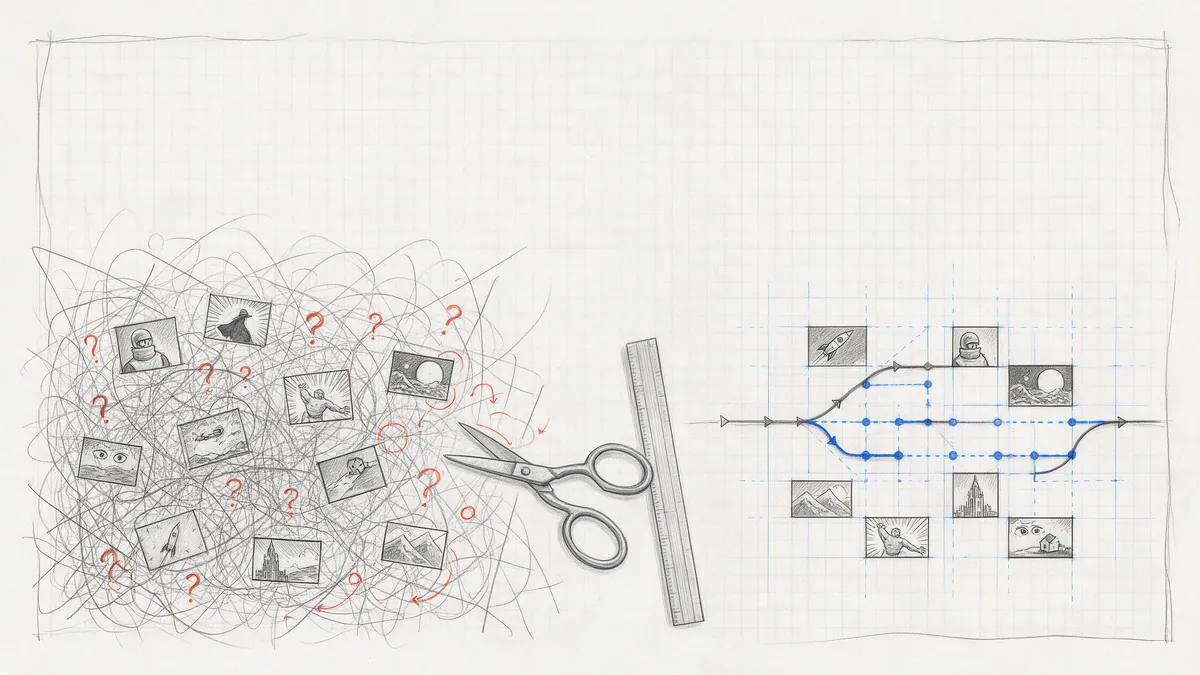
Eight patterns for keeping a branching graphic novel maintainable in PanelWave: separate flow from state from content, build choices as a triad, converge early, carry consequences in variables, and test every path before readers find the one you missed.
Every interactive story starts the same way: a clean fork on page three. By chapter four the flowchart looks like a plate of pasta, half the panels are copies of other panels with one line changed, and nobody dares touch the graph. This article is about not getting there. It assumes you know the editor basics from Getting Started with PanelWave CMS and goes straight to the design decisions that decide whether a branching work stays editable.
The short version: PanelWave gives you three separate tools, and spaghetti happens when you use only one of them. Flow lives in the chapter graph. State lives in variables. Content reacts to state through panel variants and visibility conditions. Keep the graph small, let variables carry the consequences, and let the panels reflect them.
Pattern 1: Pick the right tool for each difference
Before you draw a fork, ask what actually differs between the two paths. There are three answers, and each maps to a different mechanism in the format:
The docs summarise the trade-off in a table under Variants vs. other conditional mechanisms. Most spaghetti graphs are variants and visibility conditions that were drawn as forks.
- Readers see different panels. That is a flow difference. Use conditional edges in the Graph Editor; the graph reference has every property.
- Readers see the same panel with different content. A different background, an extra overlay, a changed line of dialogue. That is a panel variant: same node in the graph, alternative content chosen by a condition. The story flow stays fixed.
- One element toggles. A hotspot that only appears once the reader has the key, a bubble that only shows after a choice. That is a visibility condition on that element, set with the Condition Builder, and the rest of the panel is untouched.
Pattern 2: Declare your state before you branch
Variables are the story's memory, and they are typed and declared up front. Give them dot-namespaced ids that say where they belong: story.choice, stats.trust, inventory.hasKey, prefs.hints. Use an enum for any choice with a fixed set of outcomes, so a typo in a condition fails loudly instead of silently never matching.
Scope is the decision people skip. It controls when a value resets: page, chapter, global, session, or persistent. The rule of thumb from the variables guide: decisions the whole work should remember go in global or persistent, short-lived puzzle state in chapter or page, and this-visit-only flags like a dismissed hint in session. Persistent variables survive between visits, which is what makes unlockables and completion flags possible (saving progress in the player).
In the CMS this happens in the Variables designer: open a work's Backstage, choose Variables, and declare each variable once with its id, type, scope, and default. The dialog validates ids, enum lists, and defaults before anything is saved, and the same list flows into the manifest, the Preview page's overrides, and the player. If you maintain a manifest by hand, Export JSON gives you the definitions as a paste-able fragment, and importing a manifest keeps its variables section. The variables guide walks through the designer; the variables schema has the exact format.
{
  "variables": {
    "definitions": [
      {
        "id": "story.choice",
        "type": "enum",
        "enum": ["left", "right", "none"],
        "default": "none",
        "scope": "chapter"
      },
      { "id": "stats.trust", "type": "integer", "default": 50, "scope": "global" }
    ]
  }
}
Pattern 3: Build every choice as a triad
A choice in PanelWave is never a single object. It is three things that reference one variable: a hotspot that sets it, an edge per outcome that tests it, and one unconditional edge as the fallback. Build all three every time and readers can never get stuck.
On the choice panel, draw one hotspot per option and give each a Set Variables action: story.choice set to left, story.choice set to right. In the Graph Editor, select the source panel, press C, pick the target and press Enter to draw the edges, then select each edge and type its condition. Conditions are JSON Logic: one operator, a variable reference, a value. The Edge conditions section has copy-and-adapt examples for equals, greater-than, and combined rules.
{ "from": "p3", "to": "p4-left",  "condition": { "==": [{ "var": "story.choice" }, "left"] },  "priority": 1 }
{ "from": "p3", "to": "p4-right", "condition": { "==": [{ "var": "story.choice" }, "right"] }, "priority": 1 }
{ "from": "p3", "to": "p4-left",  "priority": 0 }
The third edge is the safety net: if the reader advances without clicking either door, the player takes the unconditional edge. The priority field orders competing edges when several match, as described under Branching. The player evaluates all of this at every step; the walk-through of that algorithm is in How the player walks the graph.
A naming detail that catches people: on an edge, variable writes go in the action list, while on a hotspot they go in mutations. The graph reference flags this explicitly. In the CMS you rarely touch either directly, but it matters when you read an exported manifest.
Pattern 4: Branch, then bottleneck
The classic shape for a maintainable branching story is the diamond: fork, run two or three panels per path, and converge on a shared panel. Every fork that does not converge doubles the amount of art you have to draw and the number of paths you have to test. Converge early and often.
But convergence looks like amnesia if the story forgets what happened. That is where state comes back in. The choice already lives in story.choice; the shared panels after the bottleneck can reflect it with a panel variant whose when condition tests the variable and whose overrides swap the layers or dialogue. One panel node, two versions of the beat, no duplicate panels in the graph. The docs call this choice reflection and show a complete example in The choice pattern.
Two rules for variants that save debugging later. Variants are evaluated in array order and the first match wins, so order them from most to least specific when conditions can overlap (Selection order). And an overriding layers array replaces the whole stack, so repeat the base layers you want to keep. In the editor, panels with variants show a V badge in the structure tree, and the tree's filter bar can list only those panels (Pages and Panels).
Pattern 5: Hubs, loops, and counters
Cycles are legal in a PanelWave graph, and they are how you build hubs: a room the reader returns to between explorations, a map screen, a conversation menu. The graph validation panel reports cycles as a warning, but only as a heads-up; a loop that is meant is fine (Validation).
What keeps a hub from becoming an infinite loop is a counter. Give each side quest a hotspot that increments stats.visits or toggles a boolean like story.metCourier, and put the hub's exit edge behind a condition such as stats.visits greater or equal to three. The mutation operations are set, increment, toggle, append and remove (Mutation). Readers explore in any order, the exit unlocks when they are done, and the graph stays a tidy star instead of a permutation of every order.
Pattern 6: Gate elements, do not duplicate panels
When only one thing on a panel depends on state, condition that thing. Hotspots and speech bubbles have a Visibility Condition section in the inspector; click Build Condition and the Condition Builder writes the expression for you: variable, type, operator, value, combined with AND or OR. The classic use is a locked door: hotspot A sets inventory.hasKey to true somewhere else in the story, and hotspot B on the door only becomes clickable when inventory.hasKey equals true (Conditions on hotspots).
Hotspot mutations go one step further: a When Variable Changes trigger can animate opacity, scale, position or colour the moment state changes, so artwork reacts to a choice without a panel change at all. In the published work, readers see hotspots as regions with a gentle pulsing outline and full keyboard access (the reader's view); nothing about your gating logic is visible to them.
Pattern 7: Keep the map readable
A graph you cannot read is a graph you will break. A few habits keep it legible as the work grows:
- One chapter, one graph. Every chapter has its own graph and its own entry panel. Treat chapters as the unit of branching: a chapter should contain a complete fork-and-converge, not half of one.
- Name your panels. Give panels a Friendly ID like courier-door-left in the inspector's Basic Properties (Pages and Panels); the Graph Editor labels nodes with panel titles, and the manifest can carry reader-facing node labels for chapter maps.
- Let the machine lay it out. Auto-Layout (L) arranges the graph left to right by story depth and minimises crossings; positions are remembered per chapter. The List toggle renders the same graph as a nested, screen-reader-friendly outline with entry and end badges (Moving around).
- Hide what should stay hidden. If the chapter uses the infinite canvas, set secret branches to Hidden until visited in the reveal modes so the overview zoom cannot spoil them; the same setting is recommended for paywalled panels.
Pattern 8: Test every path, then measure the real ones
Branching bugs hide in the path you did not click. PanelWave gives you three layers of checking, and they answer different questions.
Once the work is live, Analytics tells you which branches readers actually take. The reading funnel shows sessions per panel in reading order, so a steep drop right after a fork usually means the choice was unclear. The click heatmap shows where readers tap, hotspot or not; a hot cluster outside every hotspot means they expected a choice you did not offer. Both are cheaper than guessing.
- Structure: the Graph Editor's Simulate mode walks the graph from the entry, lists every outgoing edge under Where to next with its condition inline, and reports dead ends. It walks structure only and does not evaluate conditions (Simulating the flow). Press V to re-run validation, which flags unreachable nodes, isolated nodes and missing entry panels, with one-click fixes for the common cases.
- Logic: Preview lists every variable with a typed input. Override story.choice to each value and read the chapter again; save the combination as a scenario for the next round (Variable overrides). The most common branching bug, per the docs, is a condition that can never be true because nothing ever sets the variable. Test both sides of every branch.
- Release: Preflight runs work-wide checks before publishing, including flow issues like panels unreachable from the chapter entry and broken edge references (Validation and Preflight). Errors block the publish.
A worked example: the courier
Here is a full chapter designed with these patterns. Seven panels, one fork, one hub, no duplicate art.
Three edges out of panel 3 including the fallback, three loops through the hub, one exit. The graph fits on one screen, Simulate walks it in under a minute, and every consequence of the reader's choices lives in three variables you can inspect in Preview.
- Variables: story.choice (enum: left, right, none; chapter scope), stats.visits (integer, chapter scope), inventory.hasKey (boolean, global scope).
- Panels 1 to 3: linear. Panel 3 is the choice: two door hotspots, each with a Set Variables action on story.choice and a Navigate action to panel 4.
- Panel 4: one panel, two variants. The left variant adds an overlay and the line "You took the left stairs"; the right variant swaps the background. The base panel is the fallback for readers who advanced without choosing.
- Panel 5: the hub, a courtyard with three hotspots. Each leads to a side panel (6a, 6b, 6c) whose return edge increments stats.visits; the one with the key also sets inventory.hasKey to true. The hub's exit hotspot has the visibility condition stats.visits greater or equal to two.
- Panel 7: the ending. Its edge from the hub is unconditional, and a variant tests inventory.hasKey to show the unlocked version.
Further reading
- Graph Navigation: why a graph instead of a page order, and how the player walks it.
- Variables: the state model behind every condition.
- State and conditions in the player: how the runtime evaluates JSON Logic and stores state.
- Hotspots in the format: the goTo, setVariables, openExtras, openModal and pluginEvent actions.
- Monetization: where a paywall boundary belongs in a branching chapter, and how to preview as a free or premium reader.